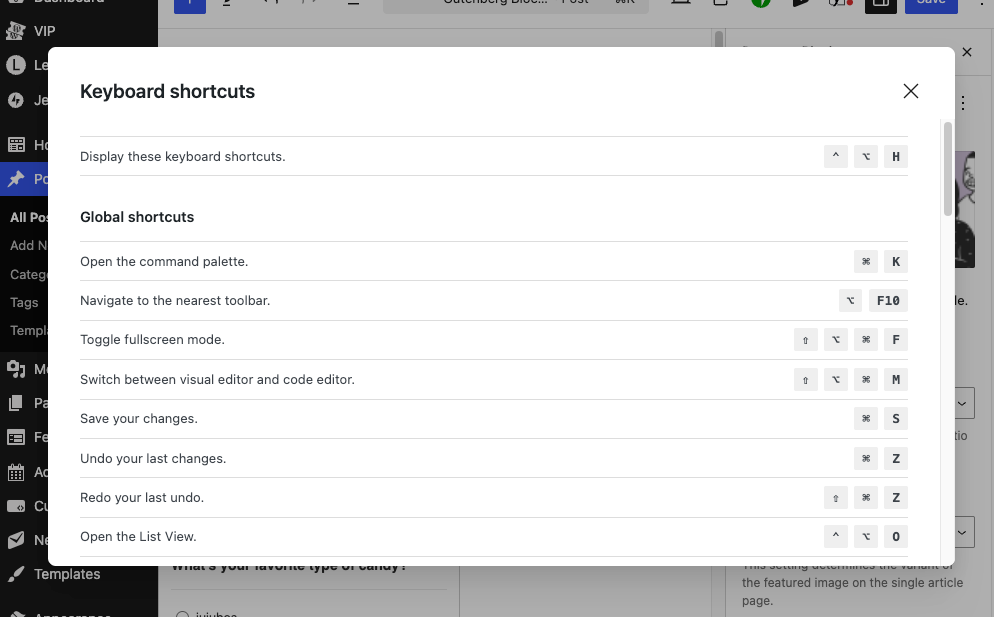
Using keyboard shortcuts in the WordPress editor offers several practical benefits that can significantly improve your content creation workflow.
You can format text, insert elements, and navigate through content much faster than clicking through menus and toolbars. Simple actions like making text bold (Ctrl/Cmd + B) become nearly instantaneous.
They also help you keep your hands on the keyboard, which reduces the back and forth movement between keyboard and mouse, which can help prevent repetitive strain and feels more natural for many writers.
The WordPress editor includes shortcuts for everything from basic formatting to inserting specific blocks and duplicating content. Once you memorize the most common ones, you’ll find your content creation process becomes noticeably smoother and faster.
Essential WordPress keyboard shortcuts
Ctrl/Cmd + B – Make selected text bold. This is probably the most frequently used formatting shortcut in any editor.
Ctrl/Cmd + K – Insert or edit a link. Super handy since linking is such a common task in web content, and it opens the link dialog instantly.
Ctrl/Cmd + Z – Undo your last action. Essential for quickly fixing mistakes or undoing accidental changes without losing your work.
/ (forward slash) – Opens the block inserter when you’re in an empty paragraph. This is unique to WordPress’s block editor and lets you quickly add any type of block by typing its name.
Ctrl/Cmd + Shift + D – Duplicate the current block. Perfect for when you want to create similar content blocks without starting from scratch.
To view all of the available shortcuts
Press Shift + Alt + H (or Shift + Option + H on Mac) to open the keyboard shortcuts help panel. This displays a comprehensive list of all available shortcuts organized by category.
You can also access this through the menu by clicking the three dots (More tools & options) in the top toolbar, then selecting Keyboard shortcuts from the dropdown menu.