Article Typography controls the size of body copy and headings inside your articles and pages, and the color of body copy. You’ll find it in the Publisher App under Settings → Typography → Article Typography.
These settings apply to article and page content only. Headlines, navigation, homepage modules and post cards are unaffected. Those follow your Brand Appearance settings.
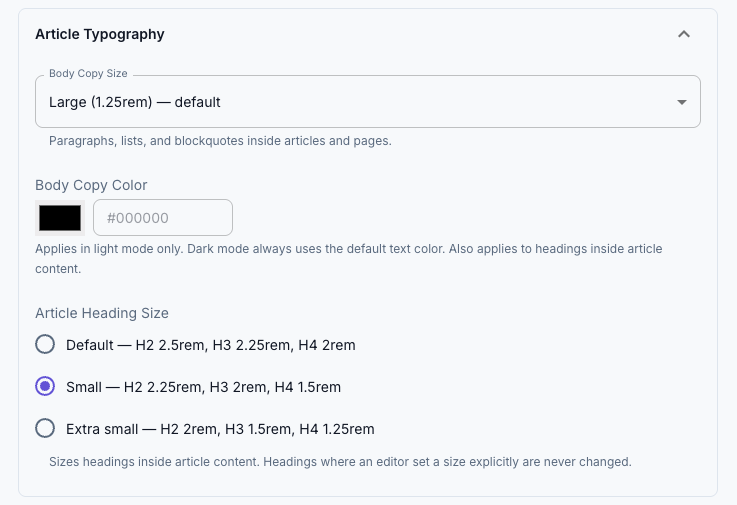
Body Copy Color
A color for article body text. Leave it blank to use the default text color (#191919).
If the color you choose doesn’t have enough contrast against your background, you’ll see a warning giving the exact ratio alongside the Web Content Accessibility Guidelines (WCAG) AA minimum of 4.5:1. It’s a warning, not a block. You can still save. Low-contrast body text is hard for everyone to read and genuinely unreadable for some of your audience, so it’s worth heeding.
In dark mode your custom color doesn’t apply. Dark mode keeps its own text color, so a color you picked against a white background can’t end up as dark grey text on a dark grey background.
Article Heading Size
Sets the whole heading scale at once, from H2 down to H6.
| Option | H2 | H3 | H4 |
|---|---|---|---|
| Default | 2.5rem (40px) | 2.25rem (36px) | 2rem (32px) |
| Small | 2.25rem (36px) | 2rem (32px) | 1.5rem (24px) |
| Extra small | 2rem (32px) | 1.5rem (24px) | 1.25rem (20px) |
H5 and H6 step down in proportion. At Extra small they land at the same size, because the scale bottoms out just below body copy.
An editor can still set a size on an individual heading in the block editor, and that choice wins. This setting governs headings that have no size of their own, which is most of them, and all of your imported ones.
Advanced overrides
Under Article Typography — Advanced you can set an exact size for body copy, or for any individual heading level, in px, rem or em. Leave a field blank to use the preset above it.
Reach for these when a preset gets you close but not quite where your design needs to be. If you find yourself filling in all of them, the preset underneath is probably the wrong starting point.
What your editors see
These settings apply in the block editor as well as on the live site, so the writing canvas matches the published article.