The Featured Post block highlights a single story in an eye-catching way, making it perfect for drawing attention to your most important content. When added to your homepage or any page, this block displays a post’s featured image, title, subtitle/dek (if used), and byline in a visually compelling format.
The block offers flexible configuration options through both the block sidebar and toolbar, allowing you to customize its appearance to match your site’s design and content strategy.
See the Featured Post Block in Action →
⚙️ Settings
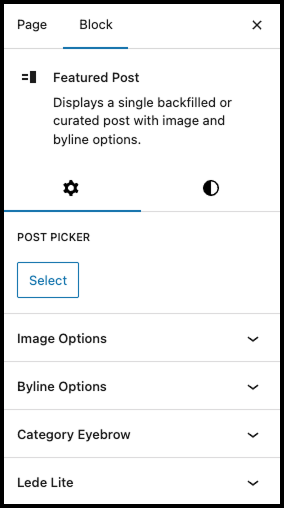
Post Picker
Select which post to feature using the post picker module. If no post is selected, the block will automatically display a backfilled post to ensure your page never appears empty.
Image Options
- Alignment: Position the featured image on the left or right side of the content. On smaller screens or narrow columns, the image automatically stacks above the text for optimal mobile viewing.
- Aspect Ratio: Choose from three preset ratios—16:9 (default), 3:2, or 1:1—to match your design aesthetic.
- Image Outline: Add an 8px outline in your primary brand color to make the featured image pop.
Byline Options
Control how author information appears:
- Default byline with avatar
- Byline without avatar
- No byline
Category Eyebrow
Display a linked category label above the image to help readers navigate related content.
Lede Lite
Enable a text-only version featuring an oversized headline—ideal for creating visual hierarchy without imagery.
◐ Styles
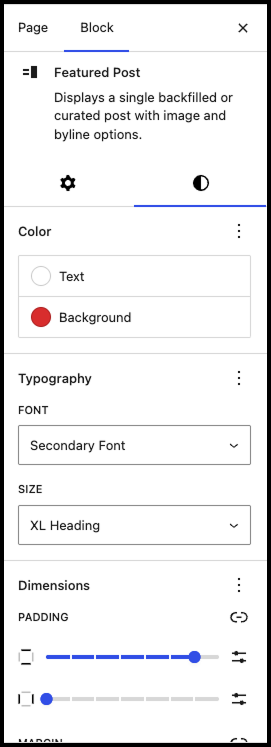
Color
Customize the text and background colors to create contrast or match your brand palette.
Typography
Customize the Featured Post block’s heading
- Font: Choose your primary or secondary font.
- Size: Choose the size of heading.
Dimensions
Fine-tune the block’s spacing:
- Padding: Space between content and block edges (think of it as bubble wrap inside the block)
- Margin: Space outside the block that controls distance from surrounding elements
Block Toolbar Settings
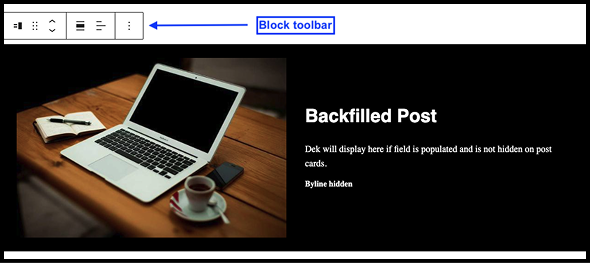
Quick-access options include:
- Text Alignment: Left, center, or right
- Full-Width Layout: Expand the block edge-to-edge (particularly effective when paired with background colors)